Naval Simulator
About & controls ↓About Naval Simulator
Take direct control of a modern frigate in this free browser naval simulator. Follow moving radar tracks, close to identification range, and scan before deciding which ship to engage. Keep the hostile in your firing arc, manage gun reloads and protect your hull while keeping civilian shipping safe. Each patrol ends with a mission debrief, and a new patrol changes the contact arrangement. Coastal navigation and harbor docking remain available as separate training exercises. This is a playable beta with simplified ship and combat models.
Back to game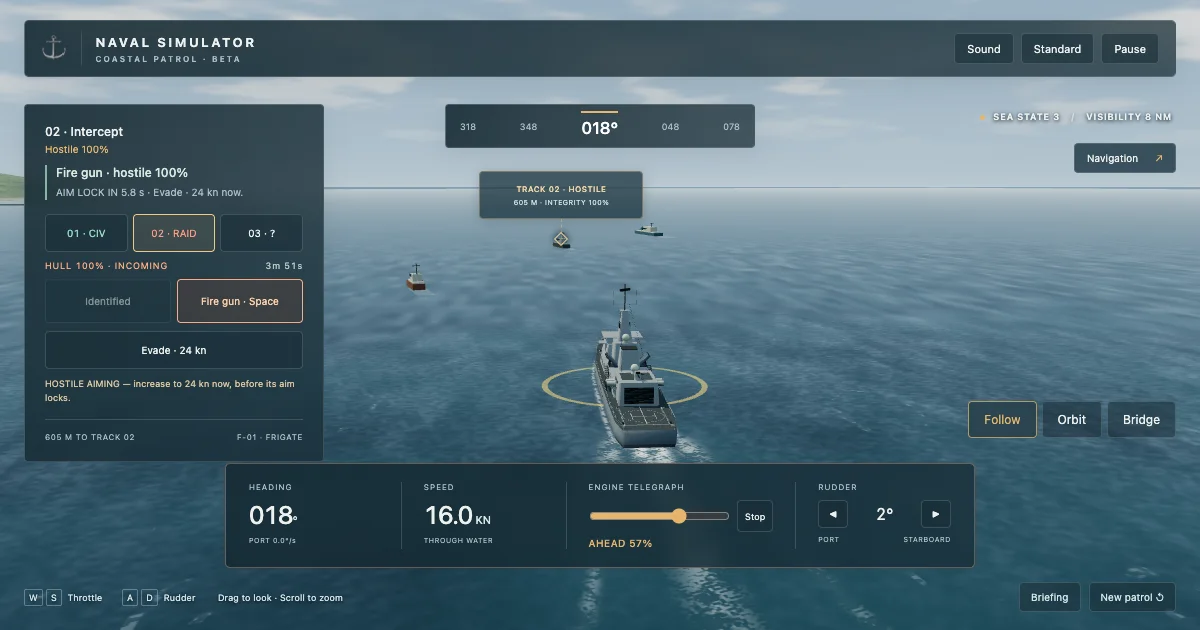
Command a frigate on a coastal patrol
- Patrol among moving contacts and identify ships through a range-limited scan.
- Engage a confirmed hostile with a firing arc, reloads and hull consequences; react to aiming warnings to evade fixed shell impact zones.
- Protect civilian shipping and review the reason for mission success or failure.
- Start a new patrol with a different contact arrangement.
- Choose coastal gate navigation or harbor docking practice from the briefing.
How to play Naval Simulator
- Start the patrol, select a radar contact and follow the bearing to bring it within identification range.
- Keep the selected contact ahead and scan it. Check the classification before engaging; civilian tracks are part of the patrol.
- Against the confirmed hostile, close to gun range and keep it in your firing arc. Fire when ready and use Evade when the hostile starts aiming. Keep moving after its orange impact zone locks, then review your hull and score in the debrief.
Controls
W/S changes engine power; A/D operates the rudder. Use the on-screen contact, scan and fire controls during a patrol. X or Stop puts the engine in neutral while the ship keeps moving; gentle astern power helps brake. Drag to look around, scroll to zoom, and use P or Escape to pause. Navigation opens the chart and optional course/speed hold. Touchscreen controls are available.
Naval Simulator questions
Is Naval Simulator free to play online?
Yes. Play Naval Simulator here for free in your browser, with no download or account required. Open the game window above and use Full screen for more room.
Can I play Naval Simulator on mobile or desktop?
Use a modern browser with WebGL 2. Desktop gives the chart and helm more room. Phones have on-screen steering and mission controls; use Open game or Full screen for more space, and switch Standard to Low if needed. Performance depends on your device.
What can I do in this naval simulator?
Play a coastal patrol with moving contacts, identification and a hostile interception. You can also choose the three-gate navigation exercise or direct harbor docking practice.
Does this naval simulator include combat?
Yes. Patrol missions include a gun engagement against an identified hostile, visible shots, reload timing, incoming fire and hull damage. The game uses simplified mechanics; it does not reproduce a complete real-world naval combat system.
Is this a realistic naval training simulator?
It is an entertainment game with simplified physics and combat. It includes gradual engine response, turning, momentum, range and firing constraints, and contact with the shore and quay. It is not a certified training tool; wind, currents and water depth are not simulated.
Can I still practice navigation and docking?
Yes. Choose coastal passage or docking from the briefing. The passage has three buoy gates with speed limits; docking requires correct clearance, heading, stopping position and a stable hold.
Why does the ship keep moving after I press Stop?
Stop puts the engine in neutral. The ship retains momentum and slows gradually. Move the engine slider below zero for gentle astern power when you need to slow down more quickly.
Does the automatic pilot complete the mission?
No. It holds a selected course and speed. You still choose contacts, identify the target, operate the gun, avoid obstacles and position the ship.
Does it save my mission?
No. Refreshing or leaving the page resets the current session. You can start a new patrol or restart a training exercise.
Is Naval Simulator a multiplayer game?
No. This is a single-player browser game. You make the decisions yourself and do not need other players to join.